

.svg)
.svg)
.svg)
.svg)
.svg)
.svg)
.svg)
.svg)
.svg)


.svg)
.svg)
.svg)
.svg)
.svg)
.svg)
.svg)
.svg)

.svg)
.svg)
.svg)

.svg)

.svg)
.svg)
.svg)
.svg)
.svg)


.svg)
.svg)
.svg)
.svg)
.svg)
.svg)
.svg)





.svg)





Text-to-give and text-to-donate are often used interchangeably, but they describe two very different ways to give by phone. With text-to-give, a donor confirms a preset donation that is added to their mobile phone bill. With text-to-donate, the donor receives a link to a mobile donation page, where they can choose their gift amount, frequency, and payment method.
That difference affects costs, payout timing, donor data, and the overall giving experience. Choosing the wrong model could leave your nonprofit paying more or your donors with fewer options. This text-to-give vs. text-to-donate guide explains how each method works—and why text-to-donate is the more practical choice for most U.S. nonprofits.
What is text-to-give for nonprofits & how does it work?
In a text-to-give campaign, donors text a keyword to a shortcode—a shortened phone number, usually five or six digits—and confirm a preset donation amount. The charge is then added to their mobile phone bill, so they don’t need to enter a credit or debit card.
Text-to-give fundraising can be useful for emergency relief campaigns and other situations that call for immediate donor action. However, it has some limitations:
❌ Donation amounts are typically fixed, so donors cannot choose how much to give
❌ Mobile carriers may cap donation amounts or limit how many times someone can donate
❌ Funds may take weeks to reach the nonprofit while carriers process and remit the payments
Carrier-billed giving through five-digit shortcodes is more familiar in the U.K. In the U.S., however, donors may be less accustomed to this giving model.
What is text-to-donate & how does it work?
With text-to-donate, donors also text a keyword to a shortcode. Instead of charging a donation to their phone bill, the reply directs them to a secure, mobile-friendly donation page.
From there, donors choose their gift amount, select a one-time or recurring donation, and complete the transaction using their preferred payment method.
Although text-to-donate requires a few more taps, it offers several advantages:
✅ Flexible donation amounts and frequencies
✅ Multiple payment methods, including Venmo, Cash App, and Apple Pay
✅ More space to share your nonprofit’s story and impact
✅ Faster payouts than carrier-billed text-to-give
✅ Opportunities to collect useful donor and transaction data
✅ Free to use on Givebutter
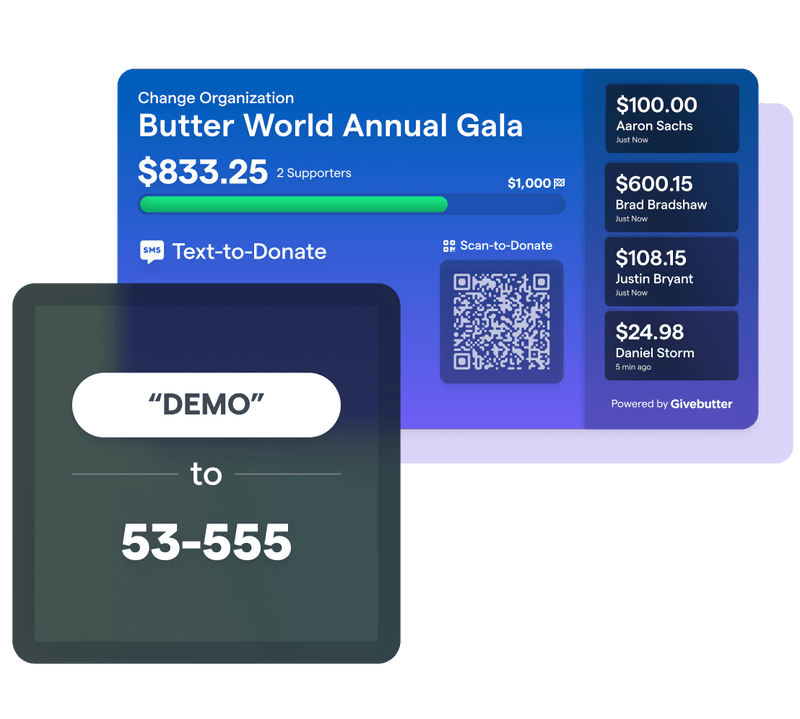
⭐ See it in action: Text “DEMO” to 53-555 to experience Givebutter’s text-to-donate flow for yourself!

Text-to-give vs. text-to-donate: A side-by-side comparison
Text-to-give vs. text-to-donate: Which is better?
For most U.S. nonprofits, text-to-donate is the better choice. It gives donors more control over their gift amount and payment method, removes the carrier intermediary, and captures more useful donor data. Carrier-billed text-to-give can still work well for urgent, high-visibility appeals built around quick, fixed donations.
Both methods are most effective when supporters are already engaged, such as at an event, during a matching campaign, or following an urgent appeal.
Download your free text messaging best practices guide
This free text messaging guide walks you through building your contact list responsibly, segmenting supporters, writing texts that drive action, and tracking your results. You’ll also get ready-to-use templates for donation appeals, event reminders, volunteer recruitment, thank-yous, and campaign updates.

How to launch a text-to-donate campaign
With free text-to-donate, you can turn any Givebutter campaign into a mobile giving opportunity. You can connect a custom keyword to a donation form, fundraising page, event, or peer-to-peer fundraising campaign, giving supporters a direct path to your cause from their phones.
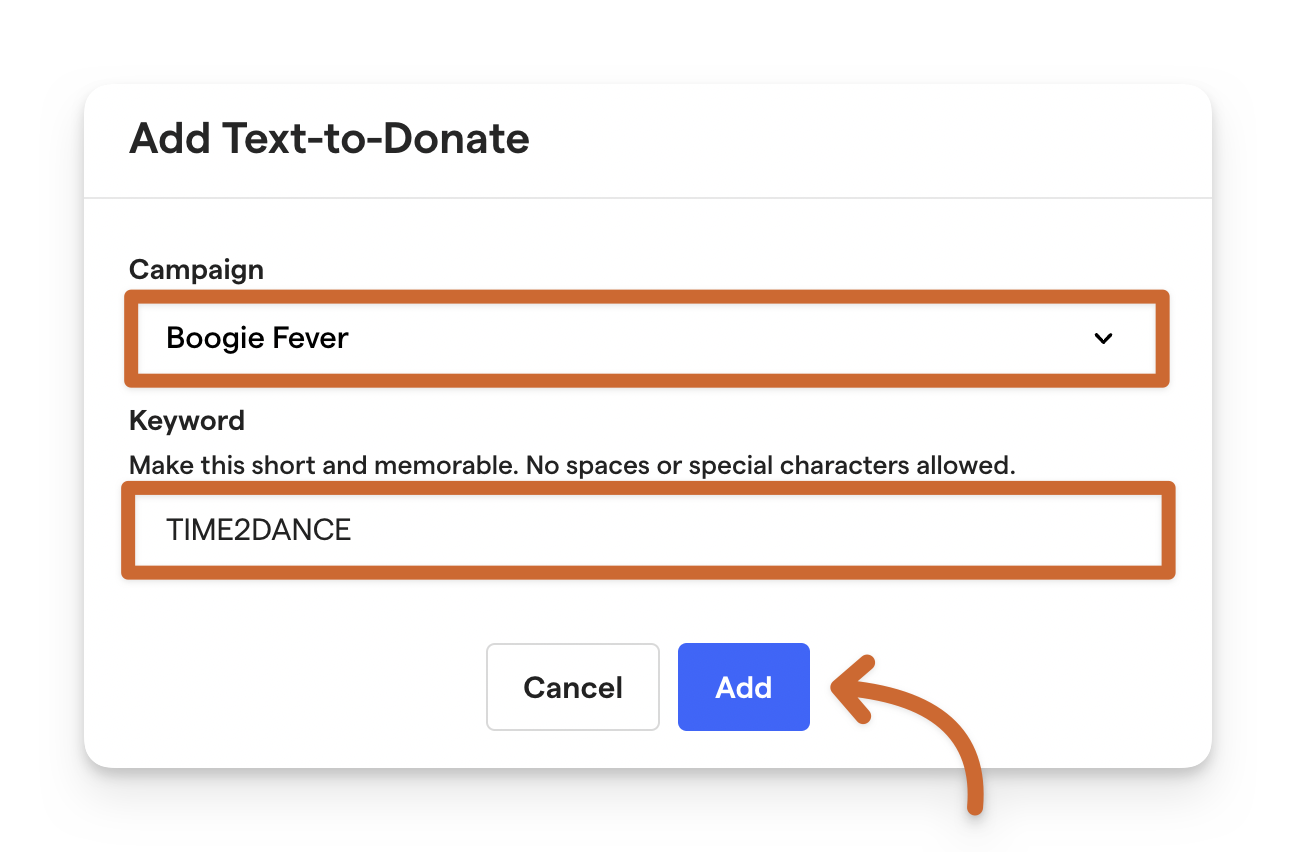
Follow these three steps to launch:
- Create your campaign and keyword 💬 Set up your Givebutter campaign, then add a short, memorable keyword under your text-to-donate settings.
- Spread the word 📣 Ask supporters to text your keyword to 53-555. They’ll automatically receive a link to your secure, mobile-friendly campaign, where they can give in just a few taps.
- See what’s working 📈 Track how many supporters text your keyword and click their unique response links, along with the total donations collected.
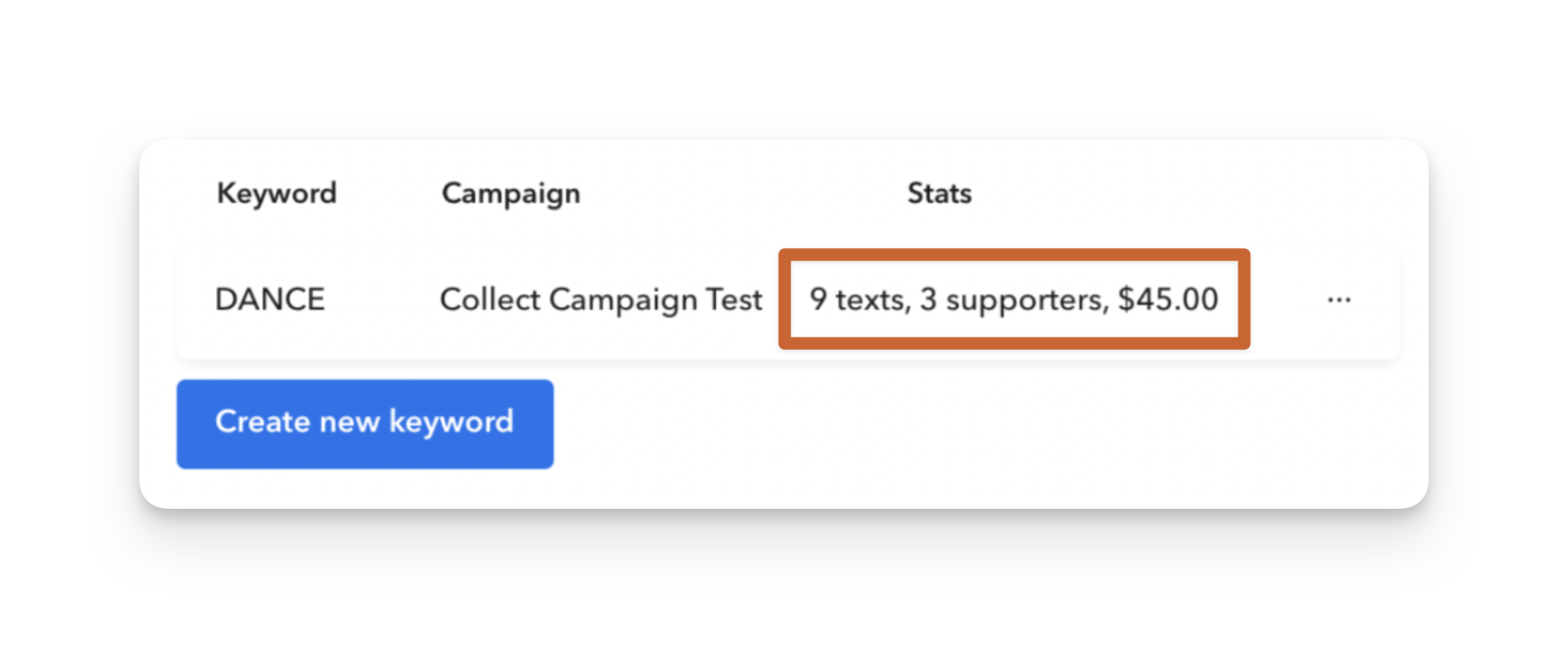
That’s it—one memorable keyword, one five-digit shortcode, and one clear path to your campaign.
✍️ Note: The 53-555 shortcode works only with U.S. phone numbers on supported U.S. carrier networks.
6 text-to-donate best practices for a stronger campaign
A memorable keyword is only the beginning. Use these six best practices to strengthen your text fundraising strategy and make mobile giving easy to find, simple to complete, and worth acting on.
1. Make your keyword short & memorable ✨
Your keyword has one job: Be easy to remember and hard to mistype.
Straightforward options like “DONATE” or “GIVENOW” are clear, but they can also feel generic. Instead, choose a keyword that connects to your cause. For example, a nonprofit providing toys to young cancer patients could ask donors to text “SMILES.”
💡 Givebutter tip: Keywords must be one word, be written in all caps, and contain only letters and numbers. They must also be unique across Givebutter, and each account can have up to five active keywords.
2. Optimize your mobile donation forms 📱
Once supporters click their response link, keep the path to giving short. Use a mobile-friendly donation form, clearly explain how each gift makes a difference, and require only the donor information you truly need.
Before launch, review the form on multiple devices to make sure every field, button, and payment option works as expected.
3. Promote your text-to-donate campaign 📣
If supporters don’t know about your text-to-donate campaign, they can’t participate. Build text-to-donate into your wider outreach strategy, so people see the same clear call to action wherever they connect with your organization.
Promote your keyword and shortcode through channels like:
- Your website
- Social media
- Email newsletters
- Campaign flyers
- Event T-shirts
- Paid advertising
- Year-end appeals
- Direct mail
- Event screens using live display
💡 Pro tip: Before launch, confirm any disclosures required for your campaign, such as “Message and data rates may apply.” If you want supporters to opt in to future outbound texts, collect that consent clearly.
4. Test the full giving experience 🧪
Before sharing your keyword, text it to 53-555 and walk through the donor journey yourself. Confirm that the response link works, your campaign looks good on mobile, and the form clearly explains what supporters should do next.
Ask a teammate to test it too. A fresh set of eyes can catch unclear instructions or unnecessary steps before supporters encounter them.
5. Build momentum in real time 🎯
At events, display your keyword and 53-555 where supporters can easily see them—on screens, signs, programs, and table cards. Repeat the call to action out loud so everyone knows exactly how to participate.
Keep the momentum going by sharing progress toward your goal, announcing matching deadlines, and celebrating milestones as donations come in.
6. Store donor data & simplify follow-up 👤
After a supporter completes their gift, Givebutter can automatically email a donation receipt with key tax information and a custom thank-you message.
Contact and transaction details flow into your nonprofit CRM, where you can review donor activity, build segments, manage profiles, and plan more personalized follow-up.
Launch a text-to-donate campaign with Givebutter
Text-to-give and text-to-donate may sound alike, but they create very different experiences for donors and fundraising teams. For most U.S. nonprofits, text-to-donate offers the flexibility, faster payouts, and donor data needed to turn in-the-moment generosity into lasting support.
With Givebutter’s text-to-donate feature, you can connect a memorable keyword to any campaign, give supporters a mobile-friendly path to your cause, and manage new donor relationships alongside the rest of your fundraising.
Make mobile giving easier with free text-to-donate
Create your free Givebutter account and turn more mobile moments into meaningful support for your mission.
FAQs about text-to-give vs. text-to-donate
What is the difference between text to give and text to donate?
Text-to-give charges a preset donation to a supporter’s mobile phone bill through their carrier. Text-to-donate sends the supporter a link to a mobile donation page, where they can choose their gift amount and payment method.
In short, text-to-give processes the donation through the carrier, while text-to-donate processes it through an online donation form.
How does text-to-give work?
In a carrier-billed text-to-give campaign, donors text a keyword to a shortcode and confirm a fixed donation amount, typically $5–$10. The charge appears on their mobile phone bill, and the carrier later remits the funds to the nonprofit.
How does text-to-donate work?
Donors text a keyword to a shortcode and receive a link to a secure, mobile-friendly donation page. With Givebutter, supporters text a campaign keyword to 53-555, choose their gift amount and payment method, and complete their donation in just a few taps.
Is text-to-donate free for nonprofits?
Yes. With Givebutter, text-to-donate is free to use with any campaign.
When does text giving work best?
Text giving works best at events, during matching campaigns, and on major giving days like Giving Tuesday, when supporters are already engaged and ready to act.
Use it as a clear call to action within a broader campaign—not as a passive channel supporters are expected to discover on their own.
Share this article









.svg)
.svg)


