

.svg)
.svg)
.svg)
.svg)
.svg)
.svg)
.svg)
.svg)
.svg)


.svg)
.svg)
.svg)
.svg)
.svg)
.svg)
.svg)
.svg)

.svg)
.svg)
.svg)

.svg)

.svg)
.svg)
.svg)
.svg)
.svg)


.svg)
.svg)
.svg)
.svg)
.svg)
.svg)
.svg)





.svg)






Most nonprofits know that videos create connection, but many aren’t sure where to start. You don’t need a production team or a big budget—a phone and a clear message are enough to get started. The best fundraising videos come down to authenticity, the right format, and a compelling script.
In this article, we’ll cover 15 video types, an eight-step process, real nonprofit examples, and practical tips for making effective fundraising videos—from campaign appeals to personal donor thank-yous.
Key takeaways
- Pick your format first 📹 Live videos are a low-lift way to create connection, but self-recorded videos are the most accessible format for first-timers.
- Match the video type to your audience 💸 Use mission videos to introduce your organization to new supporters, testimonials to build trust, asks to encourage giving, and thank-you videos to retain donors.
- Don't forget thank-yous 🙏 A personal video thank-you after a gift helps donors feel appreciated and connected to the impact they’re making.
- Shoot once, distribute everywhere ✉️ Use the same clip you film for a fundraising initiative in your next email, text, and social content campaign.
- Bring video into your fundraising and donor outreach 🧈 Embed videos on Givebutter fundraising pages for free, or use Givebutter Plus to record, send, and track personal video thank-yous from donor contact profiles.
Types of nonprofit video production
The best storytelling strategies include several video formats, each serving a different purpose in the fundraising journey.
Self-recorded videos are often the most accessible place to start. From there, live and produced videos can round out your strategy.

15 of the most effective fundraising video ideas
Fundraising videos can inform, inspire, engage, and motivate supporters to take action. Here are some of the best fundraising video examples and ideas to help you visualize how video can strengthen your next campaign.
1. Nonprofit mission or brand videos ✨
Your nonprofit brand video is essential to explaining who you are and what you stand for. It’s often your first opportunity to connect with your audience, educate them about your mission, and show how they can get involved. It doesn’t need to be long. Aim for 2–3 minutes, then repurpose the video into 30–60-second social clips.
🎯 Best for: Introducing your mission, welcoming new supporters, website homepages.
2. Fundraising livestreams 🖥️
Livestream fundraisers are the modern telethon. But instead of taking donations over the phone, you can do it all online.
Livestream videos, whether fully virtual or part of a hybrid event, allow you to share your cause with viewers while incorporating special guest appearances, performances, and spontaneous moments.
With a platform like Givebutter, you can sell tickets, collect donations, and host your livestream all from one fundraising page. Build momentum with a goal bar that updates in real time, and shout out donors as they contribute.
🎯 Best for: Virtual and hybrid events, giving days, live donor shout-outs.
🎬 See it in action: One Day for Fisk combined an in-person giving day with a livestream on its Givebutter page, allowing supporters to participate remotely. The campaign exceeded its $140K goal, raising more than $231K.
.webp)
3. Interviews 👥
Interview videos spotlight someone within your organization or wider area of work. Low-lift and easy to record on a phone, this kind of video is perfect for helping viewers learn more about your work.
Think about the people involved in your cause. Could you interview your CEO, an industry expert, or a volunteer?
🎯 Best for: Staff and volunteer spotlights, expert insights, behind-the-scenes perspectives.
4. Testimonials 💌
Testimonial videos showcase the inspirational stories from people affiliated with your cause and demonstrate the positive impact you’ve made.
Use a prompt like “What has [nonprofit name] helped you achieve?” or “Why do you donate to [nonprofit name] each month?” Respondents can self-record or have someone film for them. You can also collect video testimonials at events.
🎯 Best for: Building trust, sharing community experiences, showing why supporters give.
5. Advocacy videos 💪
Showcase your community’s experiences and perspectives to motivate viewers to take action with an advocacy campaign video.
This format can help connect your organization’s mission to a broader issue and give supporters a clearer understanding of how that issue affects their community. Make sure to end with a clear call to action.
🎯 Best for: Raising awareness, petition drives, calls to contact elected officials.
6. Special announcements 📣
Any significant news or organizational change can make a compelling video, from a new leadership team or matching gift opportunity to a new program or event. Promote your video in advance so your audience knows that big news is coming.
🎯 Best for: Matching gift announcements, campaign milestones, program launches.
🎬 See it in action: WAVE Project’s Forever Home campaign paired an embedded video with a dollar-for-dollar matching gift announcement. The page explained how the match would support year-round showers, essentials, and care for neighbors across Metro Detroit.
.webp)
7. Campaign videos 🌟
A campaign video explains what you’re fundraising for, why it matters, and what your campaign will make possible. Use it to give supporters a clear picture of your goal and motivate them to take action, whether that’s donating to a fundraising drive or emailing state officials as part of an advocacy campaign.
🎯 Best for: Campaign launches, fundraising page introductions, explaining a specific goal.
🎬 See it in action: The First Amendment Club raised more than $1M for its campaign to secure the future of The Spokesman-Review and its region. Its fundraising page pairs video with a clear campaign goal, giving supporters a place to learn more and contribute.
.webp)
8. Nonprofit explainer videos 🧠
Explainer videos are popular in the business world for communicating complex concepts or processes. In the nonprofit world, they can be used to break down a particular program, campaign, or issue so viewers understand how it works and why it’s important. These videos should be short, informative, and shareable.
🎯 Best for: Explaining programs, simplifying complex issues, answering common questions.
9. Request for donations 🙏
A donation request video communicates an urgent need and asks for funds directly.
Donation request videos can be used throughout your digital marketing campaigns and at fundraising events to inspire action. Highlight the need clearly and make it easy for supporters to take the next step with a donation link, QR code, or text-to-donate number.
🎯 Best for: Giving Tuesday, year-end appeals, urgent fundraising pushes.
🎬 See it in action: Beth Meyer Synagogue’s Open the Gates campaign featured an embedded video alongside a clear, time-bound appeal: a 48-hour fundraiser. The campaign raised more than $526K against a $425K goal.
.webp)
10. Event recaps 🔄
Fundraising events make great video content. Maybe your youth group recently held a car wash to raise money for a service trip, or you gathered volunteers to spend the day picking up trash around the city.
Recap videos give viewers a glimpse of what your nonprofit’s events are like. They help you engage with your audience, express gratitude to those who made it possible, and encourage supporters to attend or volunteer at your next event.
🎯 Best for: Celebrating event results, thanking participants, promoting future events.
11. Impact stories 💛
Impact videos feature personal stories that show how your organization has made a difference. Focus on one specific beneficiary and one measurable outcome rather than relying on aggregate statistics.
Share these videos in campaign updates or donor emails to show supporters what their gifts helped accomplish.
🎯 Best for: Reporting back to donors, showing program outcomes, connecting gifts to results.
12. Q&As 🙋
Q&A videos are low-lift opportunities to build engagement, especially when there’s organizational news or a topical discussion. Like a town hall or a Reddit AMA, you can engage with individual supporters in real time. Plus, record your livestream to spread your message further.
🎯 Best for: Answering donor questions, discussing organizational news, monthly donor check-ins.
13. Recurring video series 📅
A weekly, monthly, or quarterly video series can increase brand awareness, educate your audience, and strengthen relationships with supporters.
Whether live or pre-recorded, your series can cover news related to your cause, interviews with special guests, partner spotlights, or volunteer and staff appreciation.
Start with a monthly impact update to give donors a consistent way to see their support at work. Build it into your donor communications plan so you can maintain a manageable schedule.
🎯 Best for: Ongoing donor engagement, monthly impact updates, regular team spotlights.
14. Thank-you videos for donors 👏
Personalized video thank-yous can be an effective tool for donor retention. They create a meaningful, personal moment of gratitude. Mention the donor’s name, acknowledge their gift, and share what their support makes possible.
With Givebutter Plus video messages, you can record and send a personal video directly from a donor’s contact profile, or reuse a saved video with a personal note. Donors receive an email linking to their video, while sends, views, and emoji reactions stay connected to their profile.
🎯 Best for: Thanking donors after a gift, recognizing giving milestones, welcoming recurring donors.

15. Peer-to-peer fundraising videos 🤝
Video can also be effective for peer-to-peer fundraising campaigns. A short, personal video ask from a volunteer, board member, or other supporter can help them connect their networks to your mission and encourage more people to give.
🎯 Best for: Supporter-led appeals, team fundraising, reaching new donor networks.
🎬 See it in action: The Legal Aid Society’s 2025 Associates’ Campaign combined an embedded campaign video with team fundraising and a “Become a fundraiser” option. This setup gives participants a shared video resource to complement their own personal appeals.
.webp)
How to create a fundraising video, step by step
You don’t need a big production budget to make an impactful fundraising video. These steps will guide you through creating authentic videos, from pre-production all the way to distribution.
Step 1: Assign roles before you start 👥
Before filming anything, determine who will appear on camera and assign responsibility for recording, editing, and approving the final video. Clearly define roles up front to avoid problems that can stall your project.
One person can fill multiple roles. The important thing is to agree on your video’s audience, goal, primary channel, and deadline before you start.
Step 2: Write your fundraising video script ✍️
Write a script, rehearse, and work out any issues before you start recording. Use short, conversational sentences that sound natural when spoken aloud.
Here’s a simple fundraising video script template to follow:
- Hook: Open with a specific person, place, or moment that brings viewers into the story.
- Story: Show what’s needed and how your organization—and your supporters—can make a difference.
- Ask: Invite supporters to take action with one specific, time-bound request.
For example:
Hook: “Every Friday, 180 local families receive a box of groceries.”
Story: “Each box includes fresh produce, pantry staples, and easy-to-prepare meals. We’re working to reach 250 families, but we need your help.”
Ask: “Will you give today to help us reach our goal by Friday? Donate through the link below.”
For a donor thank-you video, replace the ask with appreciation and a specific example of what the donor’s support makes possible.
💡 Pro tip: Aim for 2–3 minutes for campaign videos, 30–60 seconds for social media videos, and 60–90 seconds for thank-you videos. Use these as starting points rather than a reason to stretch a shorter message.
Step 3: Go lo-fi 🤳
A staff member on an iPhone can be just as effective as a polished production. Instead of a high-tech studio setup, focus on what really matters: an authentic voice and a clear message.
Before recording:
- Face a window or another light source so viewers can see you clearly.
- Choose a quiet location and record a short test to check your audio.
- Keep your phone steady and position the camera at eye level.
- Choose vertical or horizontal framing based on where you’ll share the video.
If your video isn’t live, it’s okay to shoot more than once or repeat lines to get them right. Just avoid too many retakes so the message stays natural.
Step 4: Make an emotional connection 💛
Highlight real people and share photos or video clips that bring their experiences to life. Focus on one specific story rather than trying to explain every part of your organization’s work.
For example, show volunteers packing a grocery box while explaining what goes inside and who it supports. Get permission from anyone featured, and let them choose how their story is shared.
Step 5: Establish urgency and importance 🚨
Explain why you’re sharing now, and encourage your audience to take action. Focus on one core message and a clear call to action.
Use a real campaign deadline, matching gift window, or upcoming program need to explain the timing: “Give by Friday to help stock next week’s grocery boxes.”
For thank-you videos and general updates, focus on gratitude or progress rather than adding an unnecessary fundraising deadline.
Step 6: Keep it short ⏰
Get to the point quickly, and let your viewer know exactly why you’re there. Use the length benchmarks in Step 2 to guide your editing.
Cut repeated points, long introductions, and anything that doesn’t advance the story or purpose. If your campaign video runs 2–3 minutes, pull out a 30–60-second version for social media.
Step 7: Make it accessible 💬
Add captions so more supporters can follow your video, including people watching without sound. Use an automated transcription tool or assign a team member to create them, then review names, numbers, and nonprofit terminology for accuracy.
Make on-screen text large and easy to read, and say important information aloud—including your call to action—so it isn’t available only as text.
💡 Pro tip: Watch your video once without sound. Can you still understand the message and the next step?
Step 8: Distribute across channels 💌
Give every video a clear home and a plan for reaching supporters:
- Fundraising pages: Embed your campaign video where supporters can watch and donate.
- Email: Use a linked thumbnail and a short introduction that gives donors a reason to watch.
- Text: Share a video or campaign link with one concise message and a clear next step.
- Supporter feeds: Share video updates to keep supporters connected to campaign progress.
- Social media: Post a short cut with captions and tell viewers where to donate or learn more.
- Volunteer and board member networks: Provide the video link and a sample caption so supporters can easily share it.
💡 Pro tip: Match the link to the video’s purpose. A donation appeal should lead to your fundraising page; an event invitation should lead to registration. Test each link before sharing.
Turn fundraising videos into donor connections
Your next fundraising video doesn’t need a production crew. Start with one story, one clear purpose, and the phone you already have.
Givebutter helps you put that video to work. Embed it on your fundraising page, bring supporters together with livestreaming, or make your next donor thank-you personal with Givebutter Plus video messages.
Record a short message, upload an existing video, or reuse one from your library with a personal note. Sends, views, and emoji reactions stay connected to the donor’s contact profile, so your team can keep track of every thank-you.
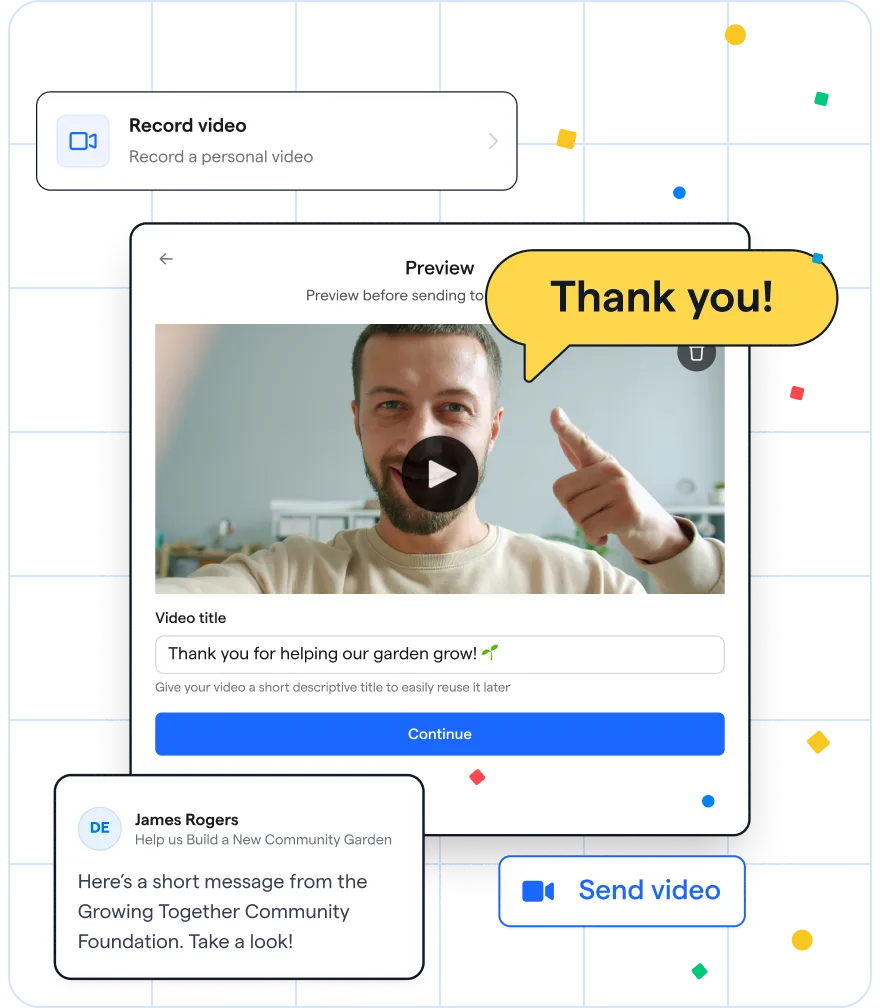
Send personal video messages with Givebutter Plus
Pick one donor to thank or one campaign story to share, and film your first 60-second video this week. Get started with Givebutter.
FAQs about video fundraising
How long should a fundraising video be?
Aim for 2–3 minutes for campaign videos, 30–60 seconds for social videos, and 60–90 seconds for donor thank-yous. Keep your message focused, and cut anything that doesn’t support its purpose.
What should I include in a fundraising video?
Include a hook that keeps viewers interested, one specific story that shows why your cause matters, and one clear action supporters can take. For a donor thank-you video, focus on gratitude and impact rather than another donation ask.
How do I make a fundraising video with no budget?
Start with your phone, natural light, a quiet location, and a real story. Keep editing simple, add captions, and use tools you already have. Givebutter’s free fundraising pages let you embed your video alongside a clear way to donate.
How do I create a donor thank-you video?
Mention the donor’s name, thank them for their gift, and explain what their support makes possible. With Givebutter Plus, you can record, upload, or select a saved video from a donor’s contact profile and send it by email. Sends, views, and emoji reactions are tracked on their profile.
Share this article









.svg)
.svg)


